Trustworthy
- One primary conversion sales would take
- Fires once per real lead
- Calls + forms attributed cleanly
Wrong conversions = Google buys the wrong clicks. Clean the signal before you blame the bid strategy.
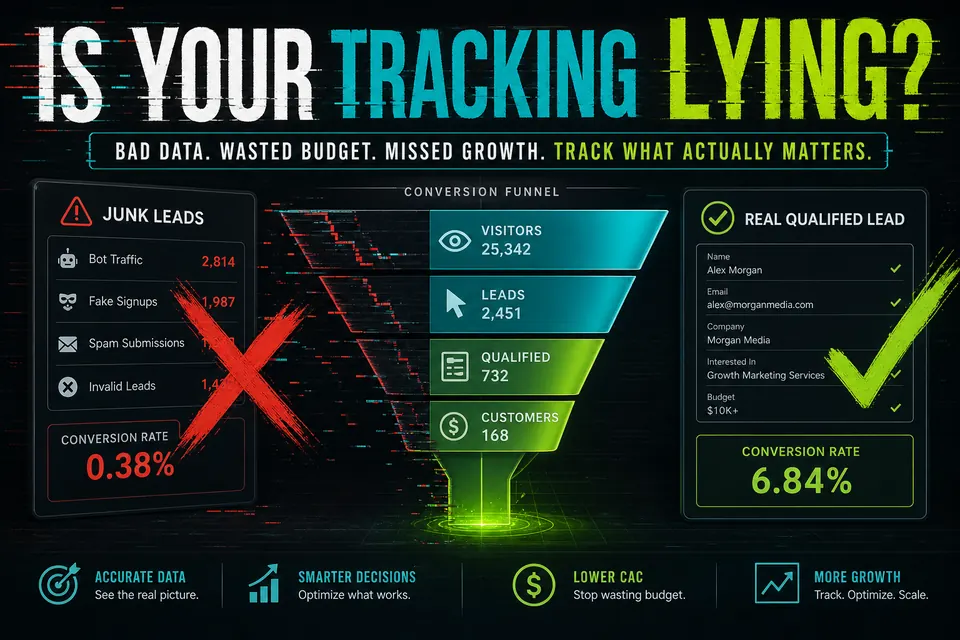
The picture above is the whole job: mark the actions that predict revenue as Primary, and keep everything else out of the bidding loop. If spam forms or “any click” sit in Primary, Smart Bidding will happily buy more of them — cheaper CPLs, worse close rates. Google’s own docs on conversion tracking are the setup baseline; this guide is the operator filter on top.
Smart Bidding learns from whatever you call a conversion — so label carefully.
Trustworthy
Lying to you
After any tag change: submit one real test lead, confirm Ads shows it once, verify Primary status, then compare form/CRM counts to Ads over seven days.
Pick the action that most closely predicts revenue. Secondary clicks can report. They should not run the account.
If sales wouldn’t call it a lead, Google shouldn’t bid on it. That single filter kills most “tracking looks fine but leads are junk” accounts.
Smart Bidding optimizes for whatever you label Primary. Spam forms, “any click,” and thank-you refreshes teach Google that cheap junk is success — so it buys more of it. The account “improves” on paper while intake complains.
Submit one real test lead. Confirm Ads shows it once. Verify Primary status. Compare form/CRM counts to Ads over seven days. If those don’t line up, you’re still training the machine on fiction.
When in doubt, follow Google’s own conversion tracking setup guidance and verify in Tag Assistant before you trust Smart Bidding again.
For platform setup details, use Google’s guide to About conversion tracking. Pair it with a page that matches the ad — see landing page anatomy for Google Ads and the Ads Eye Challenge.
Email the account and monthly Search spend — or take the Ads Eye challenge to train your eye on ad-to-page leaks.